tech.agilitynerd.com

scratching that itch... 
Filed under

search


Haystack Search Result Ordering and Pre-Rendering Results

I use Haystack and the Python Whoosh project to provide search over ~3400 articles in my Googility.com database. I had originally implemented the search in the "simplest way that works". I was making some other enhancement to Googility and noticed the search result page had two undesirable  behaviors:

  1. The ordering of results was basically random for all matching articles. For the domain of magazine article search having a bias toward the most recent publications would be more desirable.
  2. Looking at the django-debug-toolbar output each element in the search results was hitting the database twice (once for the Article instance and again for its corresponding Periodical). So a single result page was making as many as 60 database selects.

Haystack provides mechanisms to help with both of these issues.

Imposing an Order on the SearchQuerySet

Haystack models search using an API based on Django's QuerySet. The only thing to remember is it performs its queries over the Haystack SearchIndex subclass(es) you create instead of over the Django ORM. So you define a SearchIndex subclass that contains the data from the application's model overwhich you'd like to search. You can also define additional fields that can be used to modify the results of the query. Here is my magazine Article search index:

from haystack.sites import site
from haystack import indexes
from periodicals.models import Article

class ArticleIndex(indexes.SearchIndex):
    text = indexes.CharField(document=True, use_template=True)
    pub_date = indexes.DateTimeField(model_attr='issue__pub_date')

site.register(Article, ArticleIndex)

The text field contains the "document" over which the search engine (Whoosh) will actually perform the search. I'm using the template feature that allows me to use Django templates to format the data presented to the search engine.

I added the pub_date field to the index to allow the matching search results to be ordered by the pub_date field. The 'issue__pub_date' syntax mirrors the Django QuerySet syntax and means extract the "pub_date" attribute of the Article's "issue" attribute (it joins Article to Publication and get's the Publication's published date).

Then the urls.py is modified to change the SearchQuerySet passed to the default haystacksearch view to order by the ArticleIndex's pub_date attribute:

<snip>
from haystack.views import SearchView
from haystack.query import SearchQuerySet
# query results with most recent publication date first
sqs = SearchQuerySet().order_by('-pub_date')
urlpatterns = patterns('',
                       url(r'^search/',
                           SearchView(
                               load_all=False,
                               searchqueryset=sqs,
                               ),
                           name='haystack_search',
                           ),
<snip>

Pre-Rendering Result HTML

Since I have only a few thousand records I decided to follow the Haystack Best Practices for Not Hitting the Database. This solution trades space in the Whoosh index files by generating the HTML that will be displayed when each article matches along with the data used by Whoosh to match articles to search keywords. The changes were pretty simple. In the ArticleIndex:

from haystack.sites import site
from haystack import indexes
from periodicals.models import Article

class ArticleIndex(indexes.SearchIndex):
    text = indexes.CharField(document=True, use_template=True)
    pub_date = indexes.DateTimeField(model_attr='issue__pub_date')
    # pregenerate the search result HTML for an Article
    # this avoids any database hits when results are processed
    # at the cost of storing all the data in the Haystack index
    result_text = indexes.CharField(indexed=False, use_template=True)

site.register(Article, ArticleIndex)

The use_template keyword requires you to create a Django template file that is used during index creation to build the HTML that will be displayed. The only peculiarity I found was figuring out where the template should live. On my system it was at templates/search/indexes/periodicals/article_result_text.txt. I understand the periodicals/article_result_text part but I haven't looked into where the search/indexes is generated from. I imagine a reverse() to find the url for the view and "indexes" is appended to that...

The final change is the template used to display the search results. In order to not hit the database the object list generated by the haystack SearchView is placed into the context used by the template and only the result_text attribute should be accessed:

{% if page.object_list %}
<div class="search-results-title">Results <b>{{page.start_index}}</b>  - <b>{{page.end_index}}</b> for <b>{{query}}</b></div>
    <div class="search-results-list">
    {% for result in page.object_list %}
      {{result.result_text|safe}}
    {% endfor %}
    <div class="pagination">
      <span class="step-links">
        {% if page.has_previous %}
            previous
        {% endif %}
        <span class="current">
            Page {{ page.number }} of {{ page.paginator.num_pages }}
        </span>
        {% if page.has_next %}
            next
        {% endif %}
      </span>
    </div>
</div>
{% else %}
<h2>No matching articles found.</h2>
{% endif %}

The actual result is placed in the template via {{result.result_text|safe}} the safe filter is required since the HTML doesn't need to be escaped again - it was escaped by Django when it was placed into the SearchIndex.

So now my search results are in reverse chronological order and they render using only 3 database queries and at least 10x faster than before.

Filed under  //   django   haystack   search   whoosh  

Comments [0]

Improving Google Ads and Google Search Descriptions

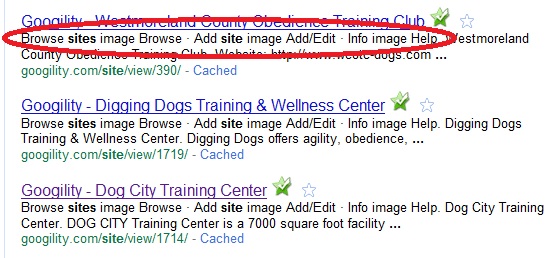
I was looking at the google search results for my Googility web site and noticed that the descriptions shown underneath the title often contained text from my navigation links instead of content from the body of the page:
Google_description
I did some searching and found the Google Webmaster blog post about description meta tags. Since almost all of the pages on Googility are generated by fewer than a dozen Django templates I edited the templates and inserted meta tags and filled the description in with data from each database entry. This avoids boilerplate information that would be ignored by Google and improves the descriptions shown to Google searchers. Some of my pages have already been reindexed:

Google_description_after

Yahoo and some other search sites use a class robots-nocontent on any page elements it should ignore for it's index, Unfortunately, Google doesn't follow this standard. So I might end up making that edit to the templates also. Looking at my site's log files it appears the Yahoo spider is hitting my site more frequently than Google's and the Yahoo index is more up to date. Looking at my analytics reports though Google refers far more readers to my site than Yahoo...

I also noticed that the ads served on pages containing mostly links appeared to be using words in my navigation or other boilerplate instead of the few lines of valuable content. More searching to the rescue and I found this Google Adsense article on section targeting. Once again editing the dozen or so templates I used were easy to edit to add in these HTML comment tags. Checking back a couple days later showed improvements in the ads being generated for those pages. I keep an eye on my Adsense click rate and see if there is any increase in ad clicks.

So a couple simple edits made noticeable improvements not bad for a couple hours investigation and implementation.

Filed under  //   adsense   django   google   search   web development  

Comments [0]