tech.agilitynerd.com

scratching that itch... 
Filed under

web development


Improving Google Ads and Google Search Descriptions

I was looking at the google search results for my Googility web site and noticed that the descriptions shown underneath the title often contained text from my navigation links instead of content from the body of the page:
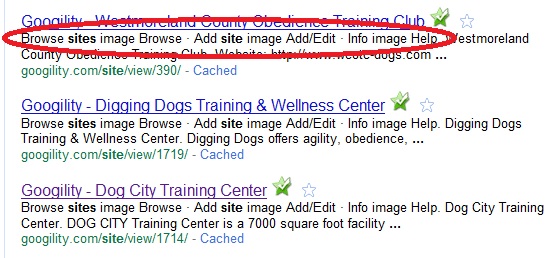
I did some searching and found the Google Webmaster blog post about description meta tags. Since almost all of the pages on Googility are generated by fewer than a dozen Django templates I edited the templates and inserted meta tags and filled the description in with data from each database entry. This avoids boilerplate information that would be ignored by Google and improves the descriptions shown to Google searchers. Some of my pages have already been reindexed:

Yahoo and some other search sites use a class robots-nocontent on any page elements it should ignore for it's index, Unfortunately, Google doesn't follow this standard. So I might end up making that edit to the templates also. Looking at my site's log files it appears the Yahoo spider is hitting my site more frequently than Google's and the Yahoo index is more up to date. Looking at my analytics reports though Google refers far more readers to my site than Yahoo...

I also noticed that the ads served on pages containing mostly links appeared to be using words in my navigation or other boilerplate instead of the few lines of valuable content. More searching to the rescue and I found this Google Adsense article on section targeting. Once again editing the dozen or so templates I used were easy to edit to add in these HTML comment tags. Checking back a couple days later showed improvements in the ads being generated for those pages. I keep an eye on my Adsense click rate and see if there is any increase in ad clicks.

So a couple simple edits made noticeable improvements not bad for a couple hours investigation and implementation.

Filed under  //   adsense   django   google   search   web development  

Comments [0]

Firediff: track and save CSS edits in Firebug

When I'm making fiddly changes to a web page I like to tweak the CSS using the Firefox Firebug plugin. It has the advantage of letting you try changes quickly and see the effect. The downside has always been that you had to then change the source CSS file to include your changes. Which increases the risk that you forget to include a change.

I was thinking about that recently when I changed the color scheme on my AgilityNerd blog and went searching for a way to at least identify the changes. Turns out there is a nice plugin that provides exactly that functionality. The Firediff plugin not only tracks changes to the CSS it also allows you to save those changes for overwriting or diff'ing into you CSS file(s).

Like other firebug related extensions you need to enable this feature per page by clicking on the arrow next to the new Changes tab.

Here is a screenshot of the plugin in action:

You can see I've changed the line-height attribute - it shows the previous and final values. A right mouse menu lets you save those changes to a file or revert them.

Another feature that can be configured in the Changes menu is whether to track changes made by other JavaScript to the page. This is an interesting feature if you were wondering how a JQuery or other JavaScript modified the page for a given effect.

This is a great plugin that I'll continue to use regularly.

Filed under  //   css   firefox addon   web development  

Comments [0]

Initial Release of django-stw

I have been using the free website thumbnail service from Shrink The Web on my dog agility search website Googility since I launched it. It is quick and easy to use and it adds a lot to the look of the pages.

I had created a simple Django template tag for inserting the little snippet of HTML needed by their service.

Recently they asked me to add support for their advanced features to my template tag. I used this opportunity to convert my templatetag to a Django application. This mostly makes it a lot easier to install but it also let me to bundle tests and an example template with the template tag.

I kept the existing shrinkthewebimage template tag and added a new tag called stwimage to enable the new features.

I'm hosting the example page included in the package here so you can see how the template tags work.

I've hosted the project source on github and uploaded the initial release to the CheeseShop for easy installation.


Filed under  //   django   github   googility   pypi   python   shrink the web   web development  

Comments [0]

Embedding JSON Within Generated HTML

Ran into an interesting problem at work this past week that had a simple and pleasing resolution. We have an in house developed JavaScript grid on some of our pages and when users entered some text strings we'd generate invalid JSON payloads that would give the user an error page. If they entered strings that looked like an HTML Entity i.e. &#13 which (with the addition of a trailing ; ) is a non-visible HTML character (carriage return) the text wasn't displayed in the widget. To further complicate things some of the content displayed in the grid is HTML which is inserted into the grid as is and can contain escaped HTML characters.

The grid gets its content as a JSON payload from within a hidden div in the HTML which is generated via a template mechanism. Heres a portion of the template where <%= and %> stringifying of the value of the Python variable(s)/code they surround:

<div style="display:none;" id="grid-init-args-<%= count %>">
    <textarea>
  <!-- this is the JSON payload loaded via the grid JavaScript -->
      <%= 
           [ columnsIndex,
            indexColumns,
            columns,
            rowBuffer,
            contractComponentCount,
            contractId,
            projectId,
            row.contractComponentID,
            row.changeOrderID,
            component.changeOrderType,
            footerRows,
            formulas,
            "false",
            rf.test] %>
    </textarea>
</div>

This approach has a number of problems:

  1. By using the template mechanism to create the JSON payload this template was relying on the similarity of the string representation of Python objects to JSON. After some testing I found the following scenarios: If a string contained a single quote character the string representation was a double quoted string around the text and the single quote; a valid JSON string. If the string contained a double quote character the string representation was a single quoted string around the text and the double quote; an invalid JSON string. If the string contained both a single and a double quote the string representation would be a single quoted string containing a slash escaped single quote and the double quote; an invalid JSON string. Depending on the browser (of course) the JSON string would fail to parse correctly when the double quote was encountered within the single quoted string.
  2. The JSON payload had to be HTML encoded (converting <, >, ", and &) since it was parsed by the browser as HTML.
  3. The HTML encoding would encode or double encode HTML to be inserted directly into the grid's DOM.

The variation in single/double quoting was an easy fix, I changed to simplejson.dumps() which correctly double quotes key/values in dicts and escapes embedded double quotes (single quotes don't need to be escaped). I didn't time it but with the C extension it may be faster than the template engine for our larger datasets.

I played around with (not) encoding various portions of the payload and then it hit me that I should change the grid to get its payload from a non HTML element so that only HTML destined for insertion into the DOM would be HTML encoded (which is as you'd expect for normal HTML handling). I started changing the payload to be stored in JavaScript generated in the template but didn't like the impact the change would have on all the existing templates. So I started Googling and found Ben Nadel's blog post on using script tags as data containers.

So here's my solution:

<div style="display:none;" id="grid-init-args-<%= count %>">
       <script type="application/json">
       <%= simplejson.dumps(
            [ columnsIndex,
             indexColumns,
             columns,
             rowBuffer,
             contractComponentCount,
             contractId,
             projectId,
             row.contractComponentID,
             row.changeOrderID,
             component.changeOrderType,
             footerRows,
             formulas,
             "false",
             rf.test]) %>
        </script>
     </div>
 

There were two changes:

  1. Used simplejson.dumps to correctly double quote and escape double quotes within the variables in the payload.
  2. Change the textarea to a script element.

By converting to a script tag within the hidden div the HTML parser no longer parsed the content of the JSON payload. so the JSON payload only needed to HTML encode HTML elements that were being inserted into the DOM created by the grid.

This change also meant I was able to delete the unnecessary HTML encoding of non-HTML JSON payload data. Got to love solutions that involve deleting code.

Ultimately, we'll convert to loading the JSON payload as a separate AJAX request from the page to the server, but for now this simplifies the markup and handles all types of user input and HTML encoded characters correctly.

Filed under  //   html   javascript   json   python   web development  

Comments [1]

Django Shrink The Web Template Tag Updated

I recently updated my Django template tag for simplifying the use of Shrink The Web images. They recently announced a CDN based distribution of images and they took the opportunity to modify their API.

The updated template tag is on django snippets.

The STW folks have asked be to extend my template tag with support for their PRO features. With luck I'll make that available sometime this weekend.

Filed under  //   django   python   shrink the web   web development  

Comments [0]

Multiple YouTube Videos per page using VideoLightBox

I decided to stop displaying the default YouTube video players within posts on my AgilityNerd blog and I started looking for a light boxed player. Their were two main reasons. The smallest video playback window provided by YouTube for HD videos is too wide for my two column layout and now that I'm posting more videos the load time of the page is delayed by the communication with all the off site webservers; serving the YouTube static image of the video will be much faster/lighter weight.

I looked around and really liked the lightbox containing the default YouTube player provided by VideoLightBox and started playing around with their demo. VideoLightBox (VLB) has an interesting approach. You download an application (PC or Mac), configure how you want your video(s) to look and it generates a directory of files on your local disk (or uploads files to your website via FTP) along with an index.html file from which you copy the code to put in the <head> and <body> of your web page. For YouTube it also downloads a static image for each selected video which is used as the image link within the HTML page. Straight forward and works well.

For my purposes there was a problem with their approach, its locates the image used to launch the light box using an element id. This assumes a single video or gallery of videos per web page. On my blog's main page or the category pages there will be multiple videos (possibly multiple videos within a single post). I figured a little bit of CSS and JQuery hacking would solve the problem and it did.

I decided to modify their HTML/CSS/JS to use a CSS class instead of an element id to allow for multiple videos per page. At first I just modified the generated files. Then I saw that VLB has template files in their installation. So I started modifying the templates to output the new code. Two hours later I bailed. Using procmon it looks like the client app reads the template files but then doesn't actually use the files to generate the output files(?). I was only able to modify one of the three template files that needed to change and have it effect the generated files.

I'm going to provide my edits to the VLB developers in case they are interested.

So the solution is to edit one of the template files and then edit two of the generated files; not ideal but once you put the generated files on your webserver you'll probably not touch them unless you are changing CSS styles. The modifications aren't hard but you need to be careful and typos will definitely break things. You should backup the VLB directory before your start or be prepared to uninstall and reinstall from their installation program.

  1. Navigate to the VideoLightBox directory (i.e. C:\Program Files (x86)\VideoLightBox)
  2. Change the permissions on the templates subdirectory to give your user full access to overwrite the files
  3. For each directory in the templates subdirectory open the videolightbox.js file in an programming editor (a keyboard macro makes this trivial):
    1. Globally replace $("#videogallery a[rel]") with
      $(".videogallery a[rel]").each(function(idx){$(this)
    2. Go to the end of the line and add });
    3. Save the file

Then generate the output files using the VLB executable for one or more videos, saving the results to your local file system

  1. Navigate to the output directory
  2. Open the index.html file in an programming editor
    1. Globally replace #videogallery with .videogallery
    2. Globally replace id="videogallery" with class="videogallery"
    3. Save the file
  3. In the engine/css subdirectory open the videolightbox.css file in an programming editor
    1. Globally replace #videogallery with .videogallery
    2. Save the file

Then you can copy the files just as specified by the VLB installation instructions.

The other change I'll be making for my deployment is to rename the video images. They are named 0.png, 1.png, etc. I'm going to put them all in a directory on my resource webserver so I'll rename the files and their references in the code copied from the index.html to use the YouTube video id.

I'll be changing my existing web posts over to this new scheme over time...

Filed under  //   css   html   javascript   jquery   video   visuallightbox   web development   youtube  

Comments [0]

Blosxom hitcounter, favorites and lastread plugins for MongoDB

When I wrote my plugins for tracking the visits to each page (hitcounter), presenting the counts by popularity (favorites), and displaying the most recently read posts (lastread) I used Perl's Storable module as a simple way to serialize the data structure to and from disk. At the time I wasn't too concerned with performance, my blog agilitynerd.com didn't suffer under the cost of the disk reads/writes.

But periodically I get DOS'd and my website becomes unresponsive. Not too suprising since Blosxom has to run as a plain CGI script; but I'm certain the disk writes of these plugins weren't helping. Occasionally the Storable on disk would become corrupted which would take down the site (not enough exception handling in the plugins).

I decided to go with Mongo as the backing data store to remove the disk reads/write from the cgi script. It supports an increment operation (ala memcached) so multiple threads can update the hit count and MongoDB will "do the right thing". It also has a query API that made rewriting favorites and lastread trivial.

I haven't tested the performance but my website, especially the favorites page, seems faster. Once I write a JavaScript client to update the hitcounts I'll be able to move the website to a fully cached deployment while still tracking hits which should make the load of running the agilitynerd blog very low.

I've hosted the plugins on github: http://github.com/saschwarz/blosxom-mongodb-plugins The mongohitcounter plugin can be configured to automatically import existing count data from the hitcounter plugin's Storable. So conversion to the new plugins just requires updating the template's variables to the new plugin names.

Filed under  //   blosxom   mongodb   perl   web development  

Comments [0]

Using django-sitemap with django-tagging

I was adding django-sitemap to googility.com yesterday and found that Tags don't implement get_absolute_url(). Which makes sense since the site developer would want to decide how to expose them in the URL space.

It is also arguable that links to pages displaying the tag view already exist in the page for models that are already in the sitemap so they don't need to be put in the sitemap explicitly. For example, a page for an Article might be at /article/django-11-release and that page would contain the links to pages linked with the tags for that article e.g. /tag/django/ and /tag/python/

But I figured having the tag pages indexed by Google would be useful. It also allows a different priority to be specified for the pages. So I made a little class that derives from GenericSitemap that allows the url and suffix for the Tag name to be specified:


class SlugSitemap(GenericSitemap):
    """Use for objects that don't implement
     get_absolute_url but have a slug field used in 
     creating their url"""
    def __init__(self, info_dict, priority=None, changefreq=None):
        GenericSitemap.__init__(self, info_dict, 
                                  priority=priority, 
                                  changefreq=changefreq)
        self.url = info_dict.get('url', '/')
        self.slugfield = info_dict['slugfield']
        self.suffix = info_dict.get('suffix', '')

    def location(self, obj):
        return "%s%s%s" % (self.url, 
                             getattr(obj, self.slugfield), 
                             self.suffix)


Here's how I use it:


sitemaps = {
    'tag_detail': SlugSitemap({'queryset':Tag.objects,
                               'url':'/tag/',
                               'slugfield':'name',
                               'suffix':'/'},
                              changefreq='monthly',
                              priority='0.5'),
}


The urls for tags are at /tag/slugname/ where /tag/ is prepended to tag.name and / is appended to the end

This class can be used to create sitemap entries for any url parameterized on a single field of an instance returned by the QuerySet.

Filed under  //   django   django-sitemap   django-tagging   python   web development  

Comments [0]

Firefox Web Developer Add-on AJAX NON-Caching Problem

I ran across some "interesting" behavior of the Firefox Web Developer Add-on today. When editing JavaScript code I normally leave Web Developer set to "disable cache". This causes all images and, significantly for my purposes, the JavaScript files to be downloaded from the server on every page request. But I ran into a unexpected problem with this setting that cost me a couple hours today.

I was working on a legacy page today that uses an AJAX POST and the response is sent to an IFRAME. The POST was successful, the results were valid and present in the IFRAME. The problem was as soon as the content of the IFRAME was eval'd() a GET was being sent to the server for the URL of the page. This GET was a problem because it had a side effect of clearing the session data (which contained the POSTed AJAX data) for the current page. So when the page's FORM was finally POSTed the server couldn't find the data in the session.

After trying numerous code changes including disabling event handlers and events, it finally occurred to me that the cache disable feature of the add-on might be causing the unexpected GET. Sure enough, once I re-enabled caching the GET stopped being sent.

It was strange that the eval() caused the GET to be requested. All the other code around processing the IFRAME's data didn't trigger it, only the eval. Strange but true.

So just something to keep in mind when strange behavior occurs on AJAX pages where session data is being used.

Filed under  //   ajax   firefox   firefox addon   web development  

Comments [0]

Highlighter - Online Source Highlighting Service

I got tired of using <tt> elements to style the source code in this blog so I went looking for a tool that will convert code to html with syntax coloring. I found the online Highlighter service does a nice job.

It handles a number of languages including: C++, Java, JavaScript, Python, Ruby, XML, SQL and some others. The supplied CSS style sheet has reasonable defaults for coloring and allows you to modify the output to suite your needs. Here is an example of some Python code for my Googility site:

  1. class AtomLatestFeed(RssLatestFeed):  
  2.     feed_type = Atom1Feed  
  3.     subtitle = RssLatestFeed.description  
  4.     link = "/feeds/atom/"  
  5.   
  6.     def item_pubdate(self, item):  
  7.         return item.modified  


So give it a whirl. I'd be interested to know if there are other services anyone likes better.

Filed under  //   source highlighting   web development  

Comments [0]